
 Skip to content
The documentation attached below shows how you can remove your profile from the Venture Christian Church Mobile Application and delete your Journals and Posts, Message History and profile entirely from our applications.
Step 1 :
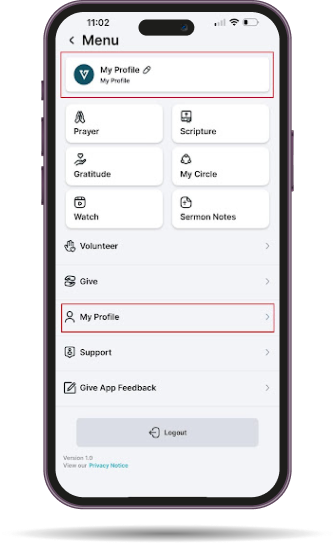
Login to the Venture Christian Church Mobile Application and navigate to “My Profile” by clicking on the hamburger menu.
Step 2 :
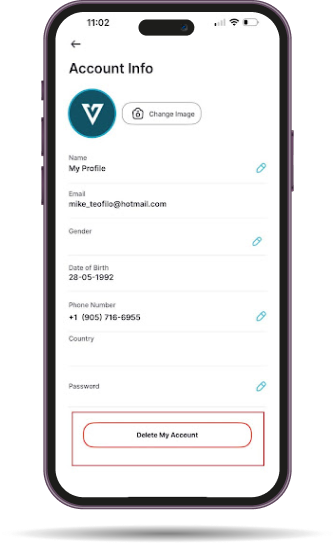
Scroll Down to the bottom of the profile and you’ll see “Delete Account”
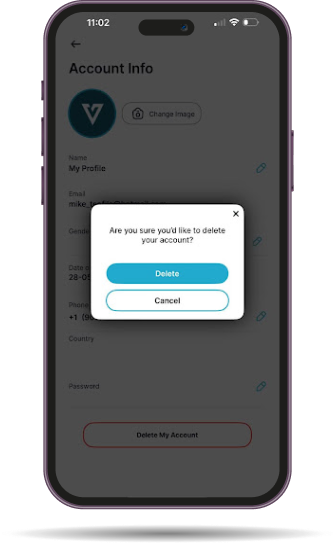
Click on “Delete Account” and follow the prompts.
Step 3 :
Once you confirm, your whole profile in it’s entirety will be removed from the application and all of its data.
Backups
We store backups of our user data for 30 days and then those backups are automatically removed. Therefore, deleting your account may have information related to your profile in a backup.
You can request at anytime for us to remove those records by contacting [email protected].
After a request has been made, we will remove your data from backups within 48 hours. An email confirmation will be sent to the email you’ve made the original request with confirmation.
Removal Of Partial Data
In the event that you’d like to remove partial data and not your entire profile, please reach out to [email protected]. Within 48 hours, an email confirmation will be sent to the email you’ve made the original request with confirmation.